
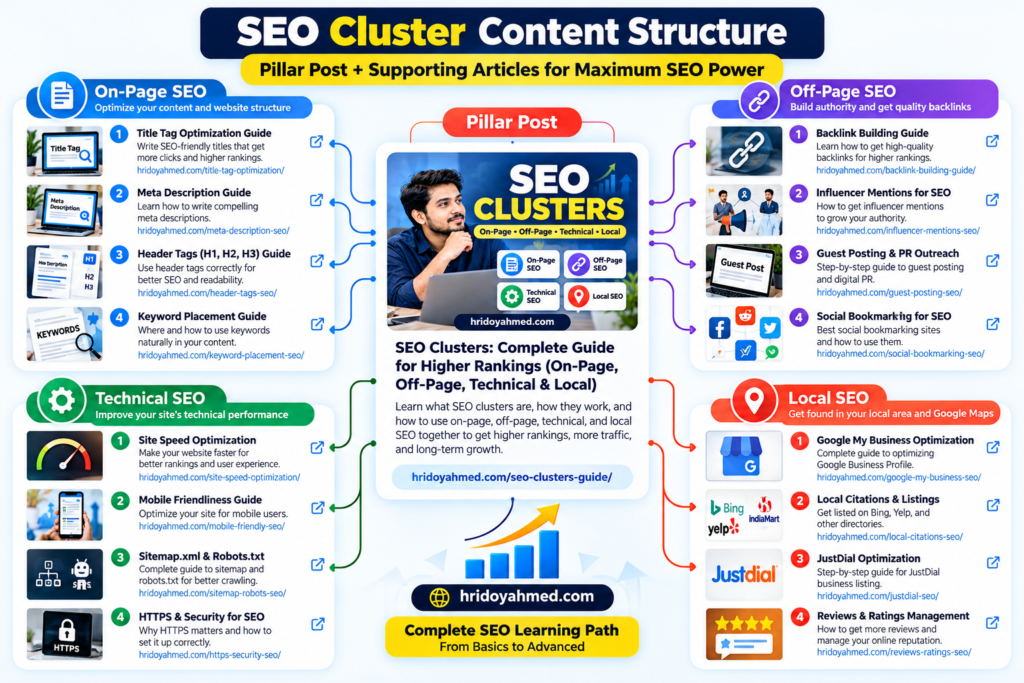
Internal linking for SEO means linking one page on your website to another relevant page on the same website. A good internal-linking strategy helps readers discover related answers and helps search engines find and understand important URLs. To build one, map your main topics, link pillar pages to useful supporting articles, connect related pages where it makes sense, use descriptive anchor text, and regularly check for broken or orphaned pages.
This guide shows how to create an internal linking structure that supports readers and your wider SEO cluster strategy—without stuffing links into every paragraph or repeating the same keyword unnaturally.
What Are Internal Links?
Internal links point from one URL on your domain to another URL on that same domain. They can appear in navigation, breadcrumbs, contextual links, related-content sections, and other useful site elements. Contextual links inside an article are particularly helpful when they lead to a resource that answers the reader’s next question.
Why Internal Linking Matters
- Discovery: links give crawlers paths to discover pages.
- Context: the surrounding text and anchor can help explain what a destination is about.
- Navigation: readers can move from an overview to a detailed answer without searching again.
- Priority: a sensible structure helps people reach important pages from relevant parts of the site.
- Conversion journeys: useful links can connect educational content to a relevant service page when that next step genuinely helps.
Internal links do not guarantee rankings. Their value depends on relevance, crawlability, page usefulness, and the broader site.
How to Build an Internal Linking Strategy
1. Map pillar pages and supporting content
Start with a short inventory of your main topics and the pages that support each one. For example, your SEO Clusters: Complete Guide can point readers to focused guides about keyword clustering, semantic SEO, and technical SEO.
2. Link where the reader needs the next answer
When a paragraph mentions a topic that deserves more detail, link to a page that provides that detail. Avoid linking every occurrence of a phrase or adding links that do not support the current task.
3. Write descriptive anchor text
Use wording that makes the destination clear, such as “technical SEO checklist for WordPress.” Avoid generic “click here” text when a descriptive phrase would be more useful. Also avoid forcing exact-match keywords into every anchor.
4. Check important pages for orphaning
An orphan page has no internal links pointing to it from other crawlable pages on your site. It may still be discovered through a sitemap or external link, but readers may struggle to find it. Use a crawler or site inventory to identify important pages with no relevant incoming links.
5. Keep links technically sound
- Use normal crawlable links with valid destinations.
- Fix broken internal links and avoid unnecessary redirect chains.
- Link to the preferred canonical URL where appropriate.
- Do not rely only on JavaScript interactions that prevent users or crawlers from following important links.
- Review links after changing a URL, deleting a page, or migrating a site.
How Many Internal Links Should a Page Have?
There is no universal ideal number. Add enough links to help readers and explain relevant relationships, but not so many that the page becomes difficult to read. A short answer may need only a few links; a comprehensive resource may naturally need more.
Internal Linking Checklist
- Every important page is reachable through relevant internal links.
- Pillar pages link to the most useful supporting pages.
- Supporting articles link back to the relevant pillar where useful.
- Anchor text accurately describes the destination.
- Links are relevant, working, and not excessively repetitive.
- Broken links and important orphan pages are reviewed regularly.
How to Measure Results
Use a crawler to review link depth, orphan URLs, broken links, and internal-link counts. Use Google Search Console to monitor search performance and indexing, and analytics to understand whether people use the links to explore relevant content or complete useful actions. Compare over time; do not assume a change in rankings was caused by internal links alone.
Frequently Asked Questions
Do internal links help SEO?
They can help search engines discover pages and understand relationships, while helping readers navigate. They are one part of a broader SEO strategy, not a ranking guarantee.
Should every supporting article link to the pillar page?
Link back when the pillar genuinely provides useful context. A consistent structure is helpful, but avoid adding irrelevant links simply to satisfy a rule.
Is exact-match anchor text always best?
No. Use natural, descriptive wording that fits the sentence. Repeating exact-match anchors unnaturally can make content worse for readers.
What is an orphan page?
An orphan page has no internal links pointing to it. Important pages should normally be reachable through a useful site structure, not just through a sitemap.
Next Step
Use this strategy alongside the complete SEO clusters guide to connect related content into a useful learning path. For planning keyword groups, read How to Cluster Keywords.