
Short answer: HTTP security headers are short instructions your server sends with every page. They tell the visitor’s browser how to handle your site safely. On arielpartners.com, wrong header code added by another developer took the site down with a 500 error. I found the problem, removed it, added headers that fit the server setup, and the site reached an A+ result [CONFIRM: tool name, for example securityheaders.com].
What are HTTP security headers?
Every time someone opens your website, your server sends the page and also some hidden information called HTTP headers. Security headers are the headers that tell the browser which actions are allowed and which are blocked.
Think of them as house rules for your website. The browser reads the rules and follows them.
Why does a website need security headers?
Without them, the browser uses default settings, and the defaults are not always safe. Security headers help to:
- Stop other websites from showing your site inside a hidden frame (clickjacking).
- Reduce the damage from injected scripts.
- Force visitors to use a secure HTTPS connection.
- Control how much page information is shared with other sites.
- Limit access to features like camera and location.
They are one security layer. They do not replace updates, backups, a firewall or strong passwords. For a full review, see my WordPress security service.
The main security headers in simple words
- Strict-Transport-Security (HSTS): tells the browser to always use HTTPS for your site.
- Content-Security-Policy (CSP): tells the browser which sources of scripts, styles and images it can trust.
- X-Frame-Options: controls whether your site can be shown inside a frame on another site.
- X-Content-Type-Options: stops the browser from guessing file types, which blocks some attacks.
- Referrer-Policy: controls how much of your page address is shared when a visitor clicks a link.
- Permissions-Policy: controls which browser features, like camera or location, your pages can use.
The problem: the site went down with a 500 error
Another developer added security header code to arielpartners.com. After that, the website went down. Visitors saw a 500 error and a critical error message.
The owner then came to me. I did not guess. I checked what had changed, step by step.
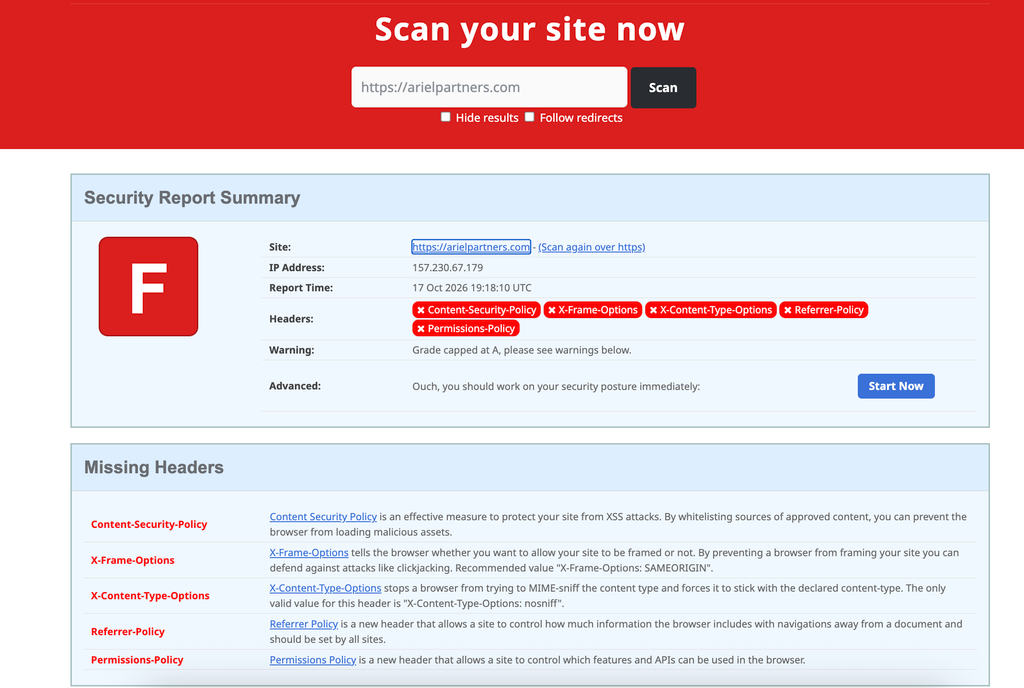
The cause: not every server takes the same code
Security header code does not work the same way on every server. Apache, Nginx and other servers each read their settings in a different format. Code written for one server can break another, and a wrong line can bring the whole site down with a 500 error.
So the code has to be configured for the server your site really runs on. [CONFIRM: which server arielpartners.com uses, for example Apache, Nginx or LiteSpeed, and the exact bug in the first code].
What I did, step by step
- Took a backup first. I saved a copy of the current files and database before I touched anything.
- Found the cause. I checked the server type and where the new code was added, and looked for the error.
- Removed the wrong code. The site came back online.
- Added new headers for this server. I wrote the headers one by one in the format this server understands, and kept them simple. [CONFIRM: where the new code was added].
- Tested the whole site. I checked the home page, inner pages, forms, images and the admin area, to make sure the headers did not block anything.
- Scanned the headers. I ran a header scanner and checked the grade.
The result: A+
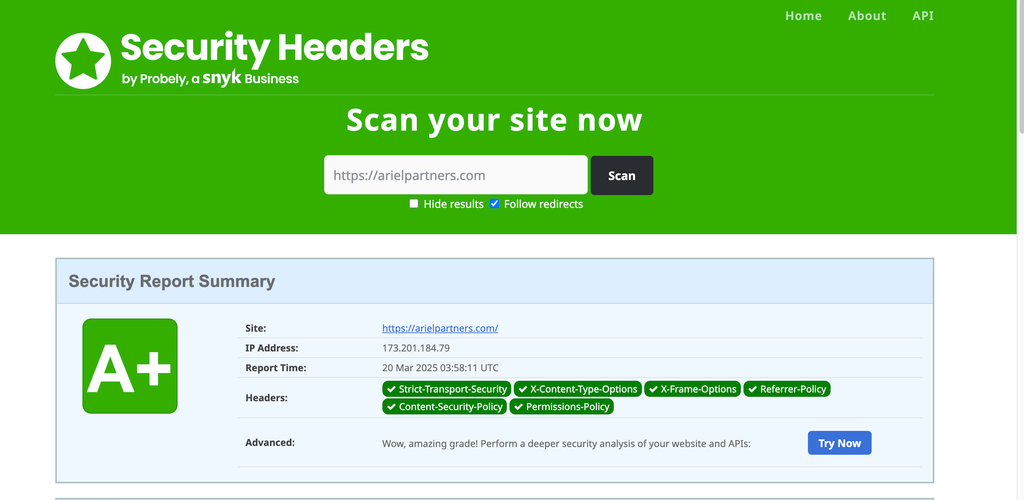
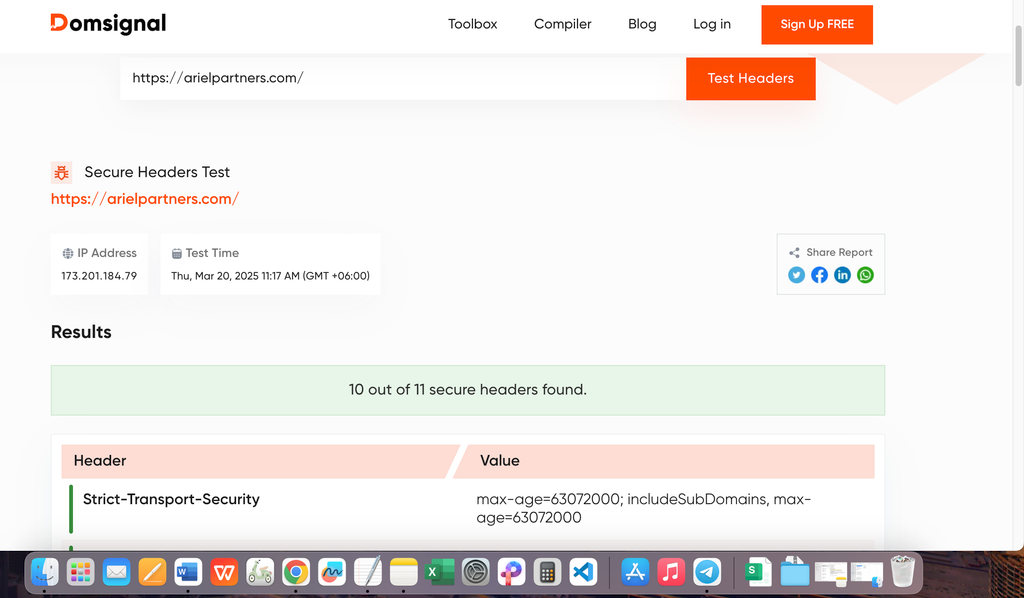
After the fix, the site was online again and the header scan showed an A+ grade [CONFIRM: tool name and date].
Why wrong header code can take a site down
- Code made for a different server type can cause a 500 error for the whole site.
- A small typo in a server file can do the same.
- A Content-Security-Policy that is too strict can block your own scripts, styles or images, and parts of the page stop working.
- HSTS should only be turned on when HTTPS works on the whole site.
- The same header added twice, for example by the server and by a plugin, can confuse.
How to add security headers safely
- Find out which server your site uses (Apache, Nginx or LiteSpeed). Your hosting panel or host support can tell you.
- Take a full backup of files and database.
- Use a staging copy of your site if you can.
- Use code written for your server type, and add one header at a time.
- Test after each header. Check the real pages and forms, not just the home page.
- Keep FTP or file manager access ready, so you can remove the code if the site goes down.
- Scan the headers again after every change.
If you do not feel comfortable with this, I can do it for you. See my WordPress security and malware removal service.
What I learned
- Always take a backup before you touch server or header code.
- Check the server type first. The same code does not fit every server.
- Change one thing at a time, so you know what caused a problem.
- A high grade is good, but the site working for real visitors comes first.
Frequently asked questions
What are HTTP security headers?
They are instructions your server sends with each page. They tell the browser what is allowed and what is blocked, which makes your site safer.
Does the same header code work on every server?
No. Apache, Nginx and other servers use different formats. Check your server type and use code made for it.
Do security headers improve SEO?
I have no official confirmation that security headers are a Google ranking factor. They improve security and trust, and HTTPS itself is a known lightweight signal.
Can wrong security headers break my website?
Yes. Wrong code can cause a 500 error, and a strict Content-Security-Policy can block your own scripts. Test after every change.
What does an A+ header grade mean?
It means the scanner found a strong set of security headers on your site. It does not mean the whole site is fully secure.
Can you add security headers to my site?
Yes. Send me a message. I check your setup first, take a backup, and test every change.
Need help with your site security?
If you would rather have this done safely for you, see my WordPress security and malware removal service or contact me for a free audit.
Related guides
- WordPress Firewall (WAF): What It Is and Do You Need One?
- WordPress Two-Factor Authentication (2FA): How to Set It Up Safely
Written by Hridoy Ahmed, SEO specialist and WordPress security expert, with 8+ years of experience.