
By Hridoy Ahmed | Last updated: October 2026 | 16 min read
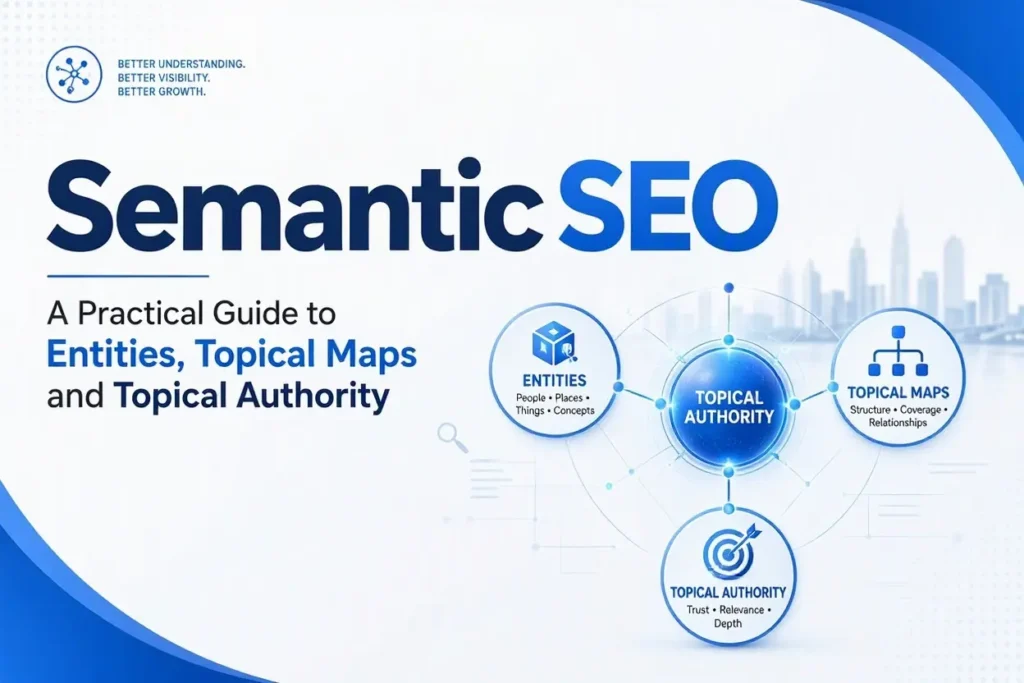
Short answer: Semantic SEO means planning and writing content around meaning instead of single keywords. You pick one main topic (an entity), cover its important attributes and questions, match each page to one search intent, connect the pages with internal links and make the page’s identity clear with structured data. The goal is a site that covers a topic completely and clearly. No one can guarantee rankings from it, and Google does not publish a “semantic SEO” ranking factor.
In this guide: 1. What semantic SEO is | 2. Why it matters now | 3. Key terms | 4. Semantic vs keyword SEO | 5. The 10-step process | 6. Example: a topical map | 7. Writing each page | 8. Schema and entity identity | 9. Tools | 10. Measuring results | 11. Mistakes | 12. Checklist | Sources | FAQ
Most guides on this topic stop at “use related keywords”. That is not enough. This guide gives you a working process: what to decide, in what order, what to check and where each idea comes from. I link to the original sources at the end so you can verify them yourself.
1. What semantic SEO is
Semantic SEO is an approach to content where you optimize for the meaning of a topic: the things (entities) involved, their attributes, how they relate and what the searcher is trying to do. Classic keyword SEO asks “which phrase should this page contain?” Semantic SEO asks “what does a person need to know about this topic, and which page answers each need?”
The idea is not new. In 2012 Google introduced its Knowledge Graph with the line “things, not strings”, explaining that a query like “taj mahal” can mean a monument, a musician or a casino, and that the system tries to understand real-world entities and how they relate. Semantic SEO is how a site owner works with that reality.
What it is not: a trick, a plugin or a guaranteed ranking method. “Semantic SEO” and “topical authority” are SEO-community terms. Google’s own documentation talks about helpful, reliable, people-first content, not about a topical authority score.
2. Why it matters now
- Google rewards helpful content. Its guidance on creating helpful, reliable, people-first content says SEO works best when applied to content made for people. Search Engine Journal reported that Google recently updated this page to put more focus on the main content of a page, meaning the part that actually does the job the page exists for.
- AI answers break questions into parts. Google’s page on AI features and your website says AI Overviews and AI Mode may use a “query fan-out” technique, which issues several related searches across subtopics. A site that covers the subtopics clearly has more chances to match. This does not guarantee that you will be cited.
- Internal links help discovery. The same Google page lists making content easy to find through internal links as a technical requirement for these features.
3. Key terms in plain words
- Entity: a clear “thing” such as a person, business, product, place or concept. Example: “WordPress malware removal”.
- Attribute: a property or question about the entity. For malware removal: symptoms, causes, cleanup steps, cost, prevention, how long it takes.
- Central entity: the one main thing your site is about. For this site, it is SEO and WordPress work done by one named expert.
- Search intent: why the person searches. Learn, compare, hire or find a place.
- Source context: who you are and why you are a fair source on the topic. A term used by Koray Tuğberk Gübür’s school of semantic SEO. Think of it as your angle and your proof.
- Topical map: the full list of pages a site needs to cover a topic, with the hierarchy, URLs, intents and links.
- Topical authority: an SEO-community idea that a site that covers a topic in depth and in a connected way becomes a stronger source for it. One often quoted definition describes it as how much of the topic you cover and for how long, as explained in this OnCrawl article by Koray Tuğberk Gübür. Treat it as a useful planning model, not a confirmed Google metric.
- EAV (Entity-Attribute-Value): a way to list facts: entity, attribute, value. “Espresso machine → pressure → 9 bar.” It forces you to write specific facts, not vague text.
- Cannibalization: two of your pages competing for the same intent.
4. Semantic SEO vs keyword SEO
- Starting point. Keyword SEO starts from a keyword list. Semantic SEO starts from the entity and what people need to know about it.
- Unit of work. Keyword SEO targets a phrase per page. Semantic SEO plans a network of pages and how they connect.
- Coverage. Keyword SEO covers what already has search volume. Semantic SEO also covers needed attributes that have little or no search volume, because they complete the topic.
- Grouping. Keyword clustering groups queries that look alike. Semantic mapping decides which pages should exist, where they sit and how they link. See my guide on how to cluster keywords for the clustering step.
- Success measure. Keyword SEO watches a rank for a phrase. Semantic SEO watches coverage, indexing, impressions across a topic and conversions.
You still need keywords. Semantic SEO changes how you choose and use them.
5. The 10-step process
Step 1. Define the central entity and your source context
Write one sentence: “This site is about [entity], for [audience], from the angle of [your experience].” Everything you publish should connect to it. A site about “everything marketing” has no center. A site about WordPress security and SEO for small business owners does.
Then write your proof: years of work, real projects, real methods. Only claim what you can show.
Step 2. List the attributes of the entity
Make a table or list: entity, attribute, value. For “WordPress malware removal” you might list: signs of infection, common causes, how to check safely, cleanup stages, Google warnings, prevention, backups, cost factors, and when to call a professional. Each attribute can become a section or a page.
Add the related entities your reader will expect to see: backup, plugin, firewall, Search Console, SSL. A page about the topic that never mentions these will feel incomplete.
Step 3. Study the real search results
Search your main queries. Note what types of pages rank (guides, tools, service pages, forums), what questions are repeated in “People also ask” and which subtopics every top page covers. This is how you check intent. If the results are all service pages, a blog post will struggle. If they are all guides, a sales page will struggle.
Step 4. Build the topical map
Group your attributes into three levels:
- Pillar: the main page for a big subtopic.
- Cluster: pages that cover one question or intent in depth.
- Supporting: short, specific pages that close gaps or answer edge questions.
Many semantic SEO practitioners also separate the core section (pages that bring revenue or define your offer) from the outer section (broader, supporting information). Plan the URL path so the hierarchy is visible, for example /services/service-name/ for the commercial page and /post-name/ for guides.
For every page, write: target intent, one primary keyword, parent page, internal links in and out, and the page’s job (inform, compare or convert).
Step 5. Remove conflicts before you write
Check each pair of pages: do they answer the same question for the same intent? If yes, merge them or change one. This is the cheapest way to avoid cannibalization. I keep a simple sheet with page, primary keyword, intent and publish date.
Step 6. Write a brief for each page
A good brief lists: the question the page answers, the direct answer in two or three sentences, the heading outline, entities and attributes to cover, questions to include as headings, examples or proof you will add and the links to place. Writers and AI tools both produce better work with a brief like this.
Step 7. Write answer-first, in plain language
Put the direct answer at the top. Then explain. Use short sentences, clear headings and facts. Add what only you can add: your own experience, screenshots, mistakes you have seen. Google’s guidance asks whether content shows first-hand experience and goes beyond what is already out there. Copying competitors’ headings and adding synonyms does not do this.
Step 8. Connect pages with internal links
- Every guide links to its service or pillar page naturally.
- The pillar page links down to its important cluster pages.
- Cluster pages link to 1 or 2 close siblings.
- Use descriptive anchor text. Say what the page is about. Never “click here”.
- Link only where the topics are truly related.
Step 9. Make the entity clear with structured data and trust pages
See the next section. In short: a real About page, clear author, Organization or Person schema that matches the visible text and consistent profiles.
Step 10. Publish in a smart order, then audit
Publish the pillar and the pages closest to your core offer first. Then the supporting pages. After a few weeks, check Search Console, find pages stuck as “Crawled – currently not indexed” and improve them (see what that status means). Update old posts. Merge weak overlapping pages.
6. Example: a small topical map from this site
Here is how the idea looks on a real site. The central entity is WordPress security. The commercial pillar is the WordPress security and malware removal service. The supporting guides each take one intent:
- How to know if your WordPress site is hacked (recognize the problem)
- How to remove the “This site may be hacked” warning (a specific Google problem)
- WordPress security checklist (prevention)
- Website security headers explained (a technical attribute)
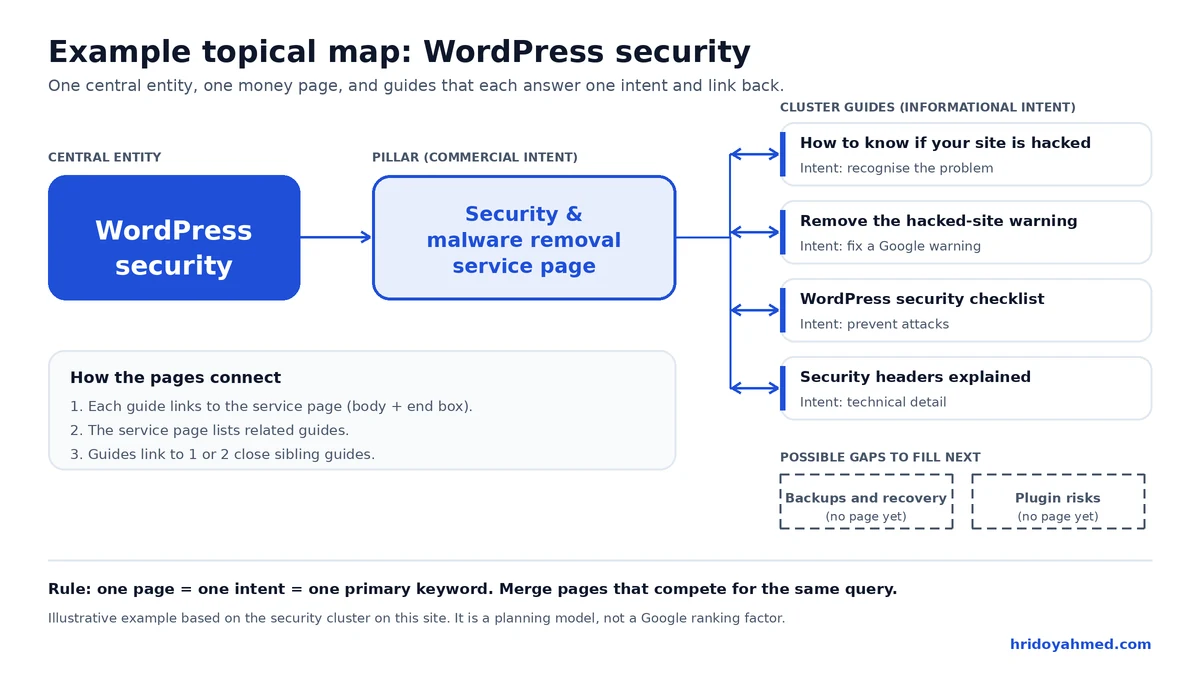
Each page has one intent, links to the service page and links to a close sibling. This is a small network. A larger map would add more attributes, such as backups, firewalls, plugin risks and recovery steps. This site is still growing, so I make no claim about results from this structure.
7. A page-level checklist for semantic writing
- One topic, one intent, one primary keyword
- Direct answer in the first 2 or 3 sentences
- Headings that match real questions
- Main attributes of the topic covered, with specific facts
- Related entities named naturally
- First-hand experience or proof added
- Links to the parent page and 1 or 2 siblings
- Clear author and last updated date
- Schema that matches the visible content
Do not try to hit a fixed “density” of related terms. Google warns against content written mainly to chase rankings. Use terms where a human reader would expect them.
8. Schema and entity identity
Structured data does not make a page rank by itself. It gives search engines a clear, machine-readable description of what the page is and who made it. Useful basics:
- Article schema for guides.
- Service schema on service pages.
- Person or Organization schema for the owner, with the same name, description and links as on your About page and profiles.
- FAQPage only when the questions and answers are visible on the page.
- LocalBusiness for local pages.
Test your markup before publishing. My guide on how to add schema markup to a WordPress page shows the steps. Make sure your SEO plugin and your theme do not output the same schema twice.
Also keep the basics consistent: the same name, bio and links on your site, social profiles and directories. This helps search engines and AI tools connect them to one entity. For more on preparing pages for AI answers, read my AI search readiness checklist.
9. Tools you can use
Free and basic:
- Google Search Console for queries, indexing and performance by page.
- Google’s search results (including “People also ask”) for intent research.
- A schema testing tool to validate structured data.
- My free SEO Analyzer and Meta Tag Generator for page-level checks.
- A spreadsheet. A plain sheet for your keyword map and topical map works well for small sites.
Tools built around the semantic SEO method:
- SemanticOS by Ayon Chy (Ayonchy) is a paid tool that, according to its website, turns a domain into a topical map (pillar, cluster and supporting pages with intents, URL paths and internal links), writes entity-based briefs and includes analysis modules such as entity drift, cannibalization checks and Search Console sync. Its site says you use your own Claude API key and that it follows an entity-first framework inspired by Koray Tuğberk Gübür’s work. These are the vendor’s own descriptions. Test it with a trial on a small project before you rely on it, and check current plans and prices on the vendor’s site.
- Ayonchy SEO Expert (Chrome extension) says it extracts entities from a Google results page and helps plan a topical map and content structure from that data.
- SEO Audit by Ayonchy is listed as a quick page check for title length, meta description, headings, image alt text, schema presence and links.
Whatever you use, a tool gives you a draft. You still need to check the intent against the real results, remove overlaps and add your own experience. The tool’s output is a plan. It is not proof that the plan will rank.
10. How to measure results
- Indexing: are the new pages indexed? Check the Pages report in Search Console.
- Coverage: in the Performance report, filter by a folder or by a group of queries on one topic and watch impressions and clicks as a group.
- Cannibalization: if two pages swap positions for one query, merge or separate them.
- Engagement and leads: track clicks from guides to service pages and enquiries.
- Time: no one can tell you a fixed number of days. Results depend on your site, niche and how consistent your publishing is. Tools that quote timelines or traffic gains are repeating their own or their users’ reports, so check how those numbers were collected.
11. Common mistakes
- Publishing many thin pages just to “cover” a map
- Two pages on the same intent
- Stuffing related terms and entities into text
- Copying the structure of top-ranking pages without adding anything new
- Ignoring technical basics such as indexing, speed and mobile layout
- Using AI to produce long text without fact-checking. Google’s guidance on AI content says output must be reviewed for accuracy before publishing
- Adding schema that does not match the visible page
- Mixing blog and service intent on one page
12. Quick start checklist
- Write your central entity and source context in one sentence.
- List 15 to 30 attributes and questions about it.
- Check the real search results for the intent of each.
- Group into pillar, cluster and supporting pages.
- Remove overlaps. Assign one primary keyword per page.
- Write briefs. Write answer-first pages with your own experience.
- Link parent, child and sibling pages with clear anchors.
- Add schema and author details. Test them.
- Publish core pages first. Check indexing weekly.
- Review every 3 to 6 months. Merge, update or remove weak pages.
Sources and further reading
- Google, Introducing the Knowledge Graph: things, not strings (2012)
- Google Search Central, Creating helpful, reliable, people-first content
- Google Search Central, AI features and your website
- Search Engine Journal, Google Changed Its Helpful Content Guidelines To Emphasize Good Main Content
- Koray Tuğberk Gübür, How to earn more traffic with semantic SEO (OnCrawl) and the Topical Authority case study at Holistic SEO & Digital. These are self-published methods and case studies, not Google statements.
- Authority Hacker, Decoding Topical Authority with Koray Tuğberk Gübür (interview summary)
- Ayonchy, SemanticOS and the Ayonchy SEO Expert extension (vendor descriptions)
FAQ
What is semantic SEO in one sentence?
It is planning content around topics, entities and search intent, so a site covers a subject completely and its pages connect clearly.
Is semantic SEO a Google ranking factor?
No. Google does not list it as one. It is a working method that fits Google’s stated goals: helpful content, clear structure and an understanding of entities.
Is topical authority real?
It is a widely used SEO model, but not a metric Google publishes. Use it to plan coverage and quality, and judge it by your own Search Console data.
Do I still need keyword research?
Yes. Keyword research shows demand and the words people use. Semantic SEO adds the entity and attribute view, so you also cover needed topics that have little search volume.
How many pages do I need for a topical map?
There is no set number. It depends on the topic. A small service business may need a pillar page and 10 to 30 supporting pages. Quality and clear intent matter more than count.
Can I use AI to build a topical map?
Yes, as a draft. AI can group topics and suggest outlines. You must check intent against real results, remove overlaps and fact-check any text before publishing.
How long does semantic SEO take to work?
There is no reliable fixed time. It depends on your site’s age, niche, content quality and how consistently you publish.
Is semantic SEO useful for local businesses?
Yes. A local site can map its service, area and trust pages the same way, and keep its name, address and phone details consistent. See my Google Business Profile guide.
Want this applied to your site? I review your pages, map your keywords and entities and fix the structure that holds your content back. See my SEO and technical SEO services.
About the author: Hridoy Ahmed is an SEO specialist and WordPress security expert based in Dhaka, Bangladesh. He has 8+ years of experience and works with clients worldwide.