
By Hridoy Ahmed | Last updated: October 2026 | 5 min read
Short answer: UTM parameters are tags you add to a link so analytics shows where visitors came from. Always set three: source, medium and campaign. Use lowercase, keep names consistent, and use UTMs only on links outside your own site.
Why use UTMs if Google Analytics already shows traffic sources?
Short answer: Google Analytics shows where a visitor came from. UTMs tell it which campaign and which exact link brought them. Without UTMs, traffic from emails, WhatsApp, messaging apps and PDFs often shows up as “Direct”, so you cannot tell what worked.
A real use case
You send one newsletter with two buttons that go to the same page. Without UTMs, Analytics shows one number for “email”. With UTMs, you can see which button, which newsletter and which offer brought the visitors.
Benefits
- See which campaign works. Compare two emails, two posts or two ads side by side.
- Stop losing traffic to “Direct”. Links shared in email, chat apps, PDFs and QR codes are often not tracked by default.
- Test small changes. Use the content field to compare two buttons or two headlines on the same page.
- Know where your budget works. Compare results from each channel and each campaign.
- Report with clean names. Your reports use names you chose, not guesses.
Is a UTM link better than the default tracking?
It is not better. It adds detail that Analytics cannot know by itself. Analytics can only read where a click came from. It cannot read your campaign name or tell two links on the same channel apart.
When you do not need UTMs
- Organic search: Analytics already tracks it. Do not tag it.
- Google Ads: it normally uses auto-tagging, so UTMs are not required.
- Links inside your own site: never tag these. It can overwrite the real traffic source.
Use UTMs on external links you control: email, social posts, bio links, partner links, QR codes and non-Google ads. Keep a canonical tag on your page, so tagged URLs do not look like duplicate pages in search.
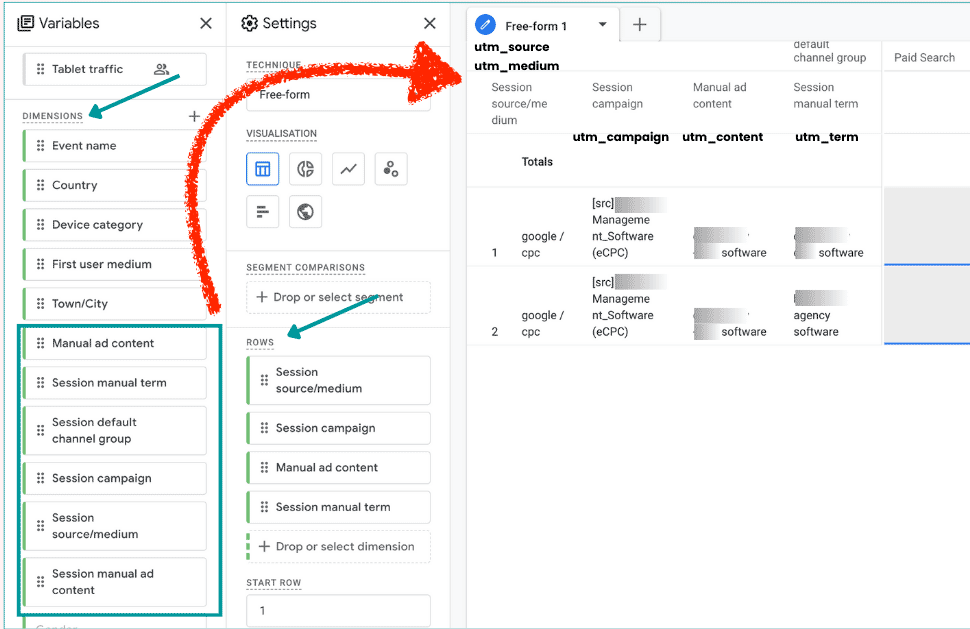
Build a UTM link in 4 steps
- Open the tool. Use my free UTM Link Builder.
- Enter the full landing page URL.
- Fill in source, medium and campaign. Term and content are optional.
- Copy the link and use it in your campaign.
What each field means
- Source: where the traffic comes from, for example newsletter or facebook
- Medium: the type of channel, for example email or social
- Campaign: the name of the campaign, for example spring-sale
- Term (optional): a paid keyword
- Content (optional): tells two links in the same campaign apart
Naming rules that save you later
- Use lowercase only. Analytics treats Email and email as different values.
- Use hyphens, not spaces
- Pick a naming list and stick to it
Common mistakes
- Using UTMs on links inside your own site. It can overwrite the original traffic source.
- Mixing upper and lower case, which splits your reports
- Putting personal data in a UTM
- Forgetting the medium
FAQ
Which UTM fields are required?
Source, medium and campaign are the three to always set.
Do UTMs affect SEO?
Not directly. They are for tracking, not ranking.
Is my link uploaded?
No. The link is built in your browser.
Try the tool: Build your UTM link. Want help setting up tracking and reports? See my SEO service.
About the author: Hridoy Ahmed is an SEO specialist and WordPress security expert based in Dhaka, Bangladesh. He has 8+ years of experience and works with clients worldwide.